Wie man Für Elise auf dem Online-Klavier spielt: Einfaches Noten-Tutorial
Haben Sie jemals die eindringlich schönen ersten Töne von Beethovens "Für Elise" gehört und sich gewünscht, Sie könnten sie spielen? Es ist eines der ikonischsten Klavierstücke der Welt, sofort erkennbar und tief bewegend. Für viele scheint es ein ferner Traum zu sein, es zu lernen, nur für diejenigen mit teuren Klavieren und jahrelangem Unterricht reserviert.
Aber was wäre, wenn Sie es jetzt sofort, kostenlos und direkt in Ihrem Browser lernen könnten?
Das ist kein Traum mehr. Mit den richtigen Werkzeugen können Sie Ihre musikalische Reise noch heute beginnen. Dieser Leitfaden führt Sie Schritt für Schritt durch das Spielen von "Für Elise" mit einem interaktiven Online-Klavier, das die Noten direkt neben den Tasten anzeigt. Wir zeigen Ihnen, wie Sie die Noten lesen, die Melodie üben und hilfreiche Lernfunktionen nutzen, um diesen zeitlosen Klassiker zu meistern.
Es ist Zeit, Ihren inneren Musiker zu entfesseln. Beginnen wir Ihre "Für Elise"-Reise auf OnlinePiano.io.
Erfolgreich starten: Ihr virtuelles Klavier & Für Elise Noten
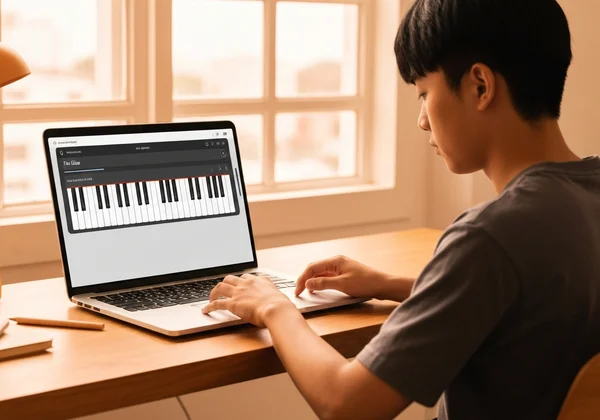
Bevor Sie Ihre erste Note spielen können, müssen Sie Ihren digitalen Übungsraum einrichten. Hier glänzt ein integriertes Online-Klavier. Vergessen Sie das Jonglieren mit einer Tastatur und einem Notenbuch. Unsere Plattform stellt beides Seite an Seite in einer einfachen Benutzeroberfläche zur Verfügung. Es ist perfekt für Anfänger.
Die vereinfachten Für Elise Noten auf unserem virtuellen Klavier laden
Der Einstieg ist unglaublich einfach und dauert weniger als eine Minute. Sie müssen keine Apps oder Software herunterladen.
- Besuchen Sie die Homepage: Öffnen Sie Ihren Webbrowser und navigieren Sie zu OnlinePiano.io. Sie sehen sofort die interaktive virtuelle Klaviertastatur.
- Noten aufrufen: Suchen Sie auf der Benutzeroberfläche nach einer Schaltfläche mit der Aufschrift "Score" oder "Sheet Music" (Noten). Ein Klick darauf öffnet die Notenbibliothek.
- Wählen Sie 'Für Elise': Durchsuchen Sie die verfügbaren Lieder und wählen Sie "Für Elise". Die vereinfachten Noten erscheinen sofort auf Ihrem Bildschirm, perfekt ausgerichtet mit dem virtuellen Klavier.
Das war's! Ihre digitale Bühne ist bereit. Sie haben jetzt die Noten und das Instrument nebeneinander, bereit, damit Sie mit dem Lernen beginnen können.
Grundlegende Notenschrift für Für Elise verstehen: Schlüssel, Noten & Rhythmen
Noten zum ersten Mal zu sehen, kann sich wie das Betrachten eines Geheimcodes anfühlen. Aber keine Sorge, wir konzentrieren uns auf die absoluten Grundlagen, die Sie für den berühmten Anfang von "Für Elise" benötigen.
Die Noten sind auf einem Notensystem geschrieben, das fünf Linien und vier Zwischenräume hat. Sie sehen zwei Notensysteme:
- Der Violinschlüssel (oberes System): Dieser sieht aus wie ein schickes '&'-Symbol (𝄞). Er sagt Ihnen, welche Noten Ihre rechte Hand spielen wird. Der größte Teil der Melodie in "Für Elise" befindet sich hier.
- Der Bassschlüssel (unteres System): Dieser sieht aus wie ein rückwärtiges 'C' mit zwei Punkten (𝄢). Er zeigt die Noten für Ihre linke Hand.
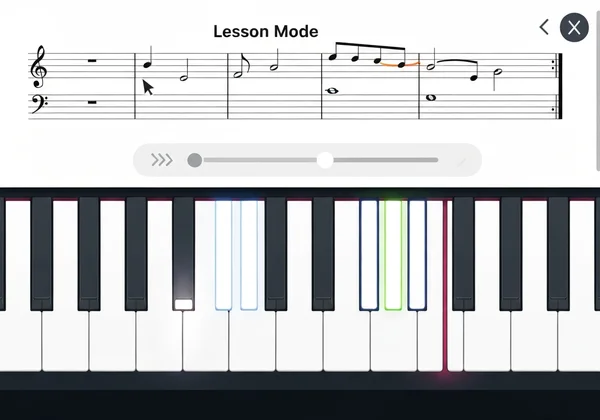
Die kleinen schwarzen Punkte auf den Linien und in den Zwischenräumen sind die Noten. Ihre Position gibt an, wie hoch oder tief sie gespielt werden sollen. Kein Raten erforderlich. Im Lernmodus leuchten die Tasten auf, während die Musik spielt. Sie sehen genau, wohin Sie Ihre Finger legen müssen.
Metronom & Notenbeschriftungen für geführtes Üben aktivieren
Um Ihren Lernprozess noch reibungsloser zu gestalten, enthält unser virtuelles Klavier praktische Hilfsmittel. Betrachten Sie sie als Ihre persönlichen Musiklehrer.
- Notenbeschriftungen: Aktivieren Sie diese Funktion, um den Namen jeder Taste direkt darauf geschrieben zu sehen (z. B. C, D, E). Dies beseitigt das Rätselraten und hilft Ihnen, eine Verbindung zwischen den Noten auf dem Notensystem und den Tasten auf dem Klavier herzustellen. Sie können sogar auf "Do Re Mi" (Solfege) umschalten, wenn Sie dies bevorzugen.
- Metronom: Ein Metronom sorgt für einen gleichmäßigen Klick, der Ihnen hilft, einen konsistenten Rhythmus zu halten. Für "Für Elise" ist der Rhythmus entscheidend. Beginnen Sie mit einem langsamen Tempo, um sicherzustellen, dass Sie jede Note für die richtige Dauer spielen, bevor Sie allmählich schneller werden.
Die Aktivierung dieser Tools bietet Ihnen eine strukturierte und unterstützende Umgebung, um mit dem Üben zu beginnen.
Schritt-für-Schritt-Anleitung: Die ikonische Melodie von Für Elise online spielen
Jetzt kommt der aufregende Teil: das Musizieren. Wir konzentrieren uns auf die ersten acht Noten, den berühmtesten Teil des Stücks. Diese unvergessliche Phrase ist ein fantastischer Ausgangspunkt und ein großer Vertrauensschub, sobald Sie sie beherrschen.
Die Eröffnungsphrase dekonstruieren: Fingerpositionen & Rhythmus
Lassen Sie uns die ikonische Eröffnungsmelodie für Ihre rechte Hand aufschlüsseln. Die Noten sind E - D# - E - D# - E - B - D - C. Machen Sie sich keine Sorgen, wenn D# kompliziert klingt; es ist einfach die schwarze Taste direkt links von E.
- Die ersten beiden Noten (E - D#): Finden Sie die E-Taste auf Ihrem virtuellen Klavier. Drücken Sie sie. Bewegen Sie sich dann zur schwarzen Taste direkt links davon – das ist D-Kreuz (D#). Die Melodie schwingt zwischen diesen beiden Tasten hin und her.
- Das Hauptmuster (E - D# - E - D# - E): Üben Sie diese schwingende Bewegung fünfmal. Versuchen Sie, sie sanft und gleichmäßig zu gestalten. Dies ist das Herzstück der Eröffnungsphrase.
- Die absteigenden Noten (B - D - C): Nach dem fünften E springt Ihre Hand nach unten, um B, dann D, dann C zu spielen.
Verwenden Sie Ihre Computertastatur oder Maus, um die Tasten auf dem virtuellen Klavier zu drücken. Folgen Sie den Noten und haben Sie keine Angst, anfangs extrem langsam zu sein.
Häufige Herausforderungen im ersten Abschnitt von Für Elise meistern
Jeder Anfänger stößt auf ein paar kleine Hindernisse. Das häufigste in diesem Abschnitt ist der schnelle Wechsel zwischen der weißen Taste (E) und der schwarzen Taste (D#). Es kann sich anfangs etwas ungeschickt anfühlen.
Wichtig ist, Ihre Hand zu entspannen und sanften Druck zu verwenden. Versuchen Sie nicht, sofort schnell zu spielen. Ihr Ziel ist Genauigkeit, nicht Geschwindigkeit. Haben Sie Schwierigkeiten mit dem Sprung von E nach B? Üben Sie nur diese eine Bewegung. Spielen Sie E, dann finden und spielen Sie B. Wiederholen Sie es, bis es sich natürlich anfühlt. Denken Sie daran, jeder große Pianist hat mit denselben kleinen Schritten begonnen.
Üben im Lernmodus: Geschwindigkeitskontrolle & visuelle Anleitung
Hier wird dieses Online-Klavier-Tool zu Ihrem wertvollsten Lernpartner. Anstatt nur statische Noten zu betrachten, können Sie den interaktiven Lernmodus nutzen.
Aktivieren Sie den Lernmodus für "Für Elise". Zwei nützliche Funktionen werden aktiviert:
- Ein Cursor verfolgt die Noten auf dem Notensystem und zeigt Ihnen in Echtzeit genau an, welche gespielt wird.
- Die Klaviertasten leuchten auf, um Ihre Finger an die richtige Stelle zu führen.
Die wertvollste Funktion hier ist die Geschwindigkeitskontrolle. Sie können die Wiedergabe extrem verlangsamen. Dies ermöglicht es Ihnen, zuzusehen, zuzuhören und in einem Tempo mitzuspielen, das für Sie angenehm ist, wodurch Sie Muskelgedächtnis und Selbstvertrauen aufbauen, ohne sich gehetzt zu fühlen.
Verfeinern & Aufnehmen: Für Elise meistern mit unseren virtuellen Klavierfunktionen
Sobald Sie mit der grundlegenden Melodie vertraut sind, ist es Zeit, Ihr Spiel zu verfeinern und diese Noten in echte Musik zu verwandeln. Hier arbeiten Sie an Fluss, Genauigkeit und daran, eine Darbietung zu schaffen, auf die Sie stolz sein können. Die Plattform bietet auch Tools, die Ihnen in dieser Phase helfen.
Die Kraft des langsamen Übens: Genauigkeit und Fluss aufbauen
Jeder Musiklehrer schwört darauf: üben Sie langsam. Es mag kontraintuitiv klingen, aber langsam zu üben ist der schnellste Weg, gut spielen zu lernen. Wenn Sie langsam vorgehen, geben Sie Ihrem Gehirn Zeit, die Informationen zu verarbeiten, und Ihren Fingern Zeit, die richtigen Tasten zu finden.
Verwenden Sie die Geschwindigkeitskontrolle im Lernmodus, um mit 50 % Geschwindigkeit oder sogar langsamer zu üben. Konzentrieren Sie sich darauf, jede Note sauber und mit einem gleichmäßigen Rhythmus zu treffen. Sobald Sie die Phrase zehnmal hintereinander in langsamem Tempo perfekt spielen können, sollten Sie das Tempo nur leicht erhöhen. Dieser methodische Ansatz schafft eine starke Grundlage und verhindert, dass Sie sich Fehler angewöhnen.
Ihren Für Elise Fortschritt aufnehmen: Von Noten zu MP3
Einer der lohnendsten Teile beim Erlernen eines Instruments ist es, den eigenen Fortschritt zu hören. Die Plattform bietet ein einzigartiges duales Aufnahmesystem, das Ihnen dabei hilft.
- Noten aufnehmen: Diese Funktion agiert wie ein MIDI-Recorder. Sie erfasst die exakte Abfolge der Noten, die Sie spielen, nicht den Klang. Dies ist ein erstaunliches Analysewerkzeug. Sie können es abspielen und beobachten, wie die Tasten aufleuchten, um zu sehen, ob Sie falsche Noten gespielt haben oder ob Ihr Timing nicht stimmte.
- Audio-Recorder: Sobald Sie sich sicher fühlen, verwenden Sie den Audio-Recorder. Dieser erfasst den tatsächlichen Klang Ihrer Darbietung und ermöglicht es Ihnen, ihn als MP3-Datei herunterzuladen.
Nehmen Sie Ihren ersten "Für Elise"-Durchgang auf. Laden Sie die MP3 herunter. Teilen Sie sie mit Freunden und Familie. Spüren Sie die Zufriedenheit! Sie können Ihre Musik aufnehmen und Ihre Verbesserungen im Laufe der Zeit verfolgen.

Starten Sie Ihre 'Für Elise'-Reise noch heute
Das Erlernen eines ikonischen Stücks wie Beethovens "Für Elise" ist eine lohnende Reise, die heute zugänglicher ist als je zuvor. Sie benötigen kein physisches Klavier oder teuren Unterricht, um zu beginnen. Alles, was Sie brauchen, ist der Wunsch zu lernen und die richtigen Online-Tools, die Sie anleiten.
Durch die Verwendung einer integrierten Plattform können Sie:
- Noten und Tastatur an einem Ort sehen.
- Mit visuellen Hilfen wie Notenbeschriftungen und Tastenmarkierungen lernen.
- In Ihrem eigenen Tempo mit einstellbaren Geschwindigkeitsreglern üben.
- Ihre Darbietung aufzeichnen, um Ihren Fortschritt zu verfolgen und Ihren Erfolg zu teilen.
Sie haben alles, was Sie brauchen, um vom Träumen von "Für Elise" zum Selberspielen zu gelangen. Die ersten Töne warten. Ihre musikalische Reise beginnt mit einem einzigen Klick.
Bereit, Ihre erste Note zu spielen? Besuchen Sie jetzt OnlinePiano.io, laden Sie die "Für Elise"-Noten und erleben Sie noch heute die Freude am Musizieren!
Häufig gestellte Fragen zum Online-Spielen von Für Elise
Wie kann ich die Für Elise Noten auf dieser Plattform effektiv lesen?
Der beste Weg ist, die integrierten Funktionen zu nutzen. Mit den Noten und dem virtuellen Klavier nebeneinander können Sie sofort die Verbindung zwischen einer Note auf der Seite und einer Taste auf dem Klavier erkennen. Aktivieren Sie den "Lernmodus", damit ein Cursor den Noten beim Spielen folgt, und schalten Sie "Notenbeschriftungen" ein, um die Namen der Tasten zu sehen. Diese Kombination macht das Lesen der Noten intuitiv und einfach.
Ist Für Elise für Anfänger auf einem virtuellen Klavier schwer zu lernen?
Das gesamte Stück ist anspruchsvoll, aber das berühmte Eröffnungsthema ist für Anfänger sehr gut zu bewältigen. Der Schlüssel liegt darin, es in kleine, leicht zu lernende Phrasen zu zerlegen. Ein virtuelles Klavier macht es noch einfacher, da Tools wie Geschwindigkeitskontrolle und visuelle Notenführungen viele der anfänglichen Frustrationen beseitigen, mit denen neue Lerner konfrontiert werden.
Wo kann ich online kostenlos Klavier mit einer Partitur wie Für Elise üben?
Diese Plattform ist eine der besten kostenlosen Optionen. Sie bietet ein hochwertiges virtuelles Klavier mit einer integrierten Notenbibliothek, einschließlich einer vereinfachten Version von "Für Elise", die perfekt für Anfänger ist. Das gesamte Erlebnis – Spielen, Lernen mit der Partitur und Aufnehmen – ist völlig kostenlos und direkt in Ihrem Browser zugänglich. Probieren Sie unser kostenloses Tool aus, um sich selbst zu überzeugen.
Wie nehme ich meine Für Elise Darbietung auf dem Online-Klavier auf?
Die Plattform bietet zwei Aufnahmeoptionen. Für die Analyse verwenden Sie die Schaltfläche "Noten aufnehmen", um Ihre Tastenanschläge zu erfassen und auf Genauigkeit zu überprüfen. Wenn Sie bereit sind, Ihre Darbietung zu speichern, verwenden Sie die Schaltfläche "Audio-Recorder". Diese nimmt den Klang Ihres Spiels auf, und sobald Sie anhalten, haben Sie die Möglichkeit, die Aufnahme als MP3-Datei herunterzuladen.
Kann ich die Geschwindigkeit des Für Elise Tutorials mit diesem Tool anpassen?
Ja, und das ist eine der nützlichsten Lernfunktionen. Wenn Sie sich im "Lernmodus" befinden, sehen Sie einen Geschwindigkeitsschieberegler oder eine Tempo-Steuerung. Sie können diesen ziehen, um das Lied deutlich zu verlangsamen, sodass Sie in einem Tempo mitfolgen und üben können, das sich für Sie angenehm anfühlt. Dies ist unerlässlich, um schwierige Passagen zu meistern.