Sight-Reading Mastery: Sheet Music Fingerings for Online Piano
Have you ever sat down to play a new piece of music, only to find your hands getting tangled up after just a few notes? You know the note you need to hit, but you aren't sure which finger should strike it. This is a common hurdle for many music students. You might wonder: How can you learn to read notes and move your fingers smoothly at the same time?
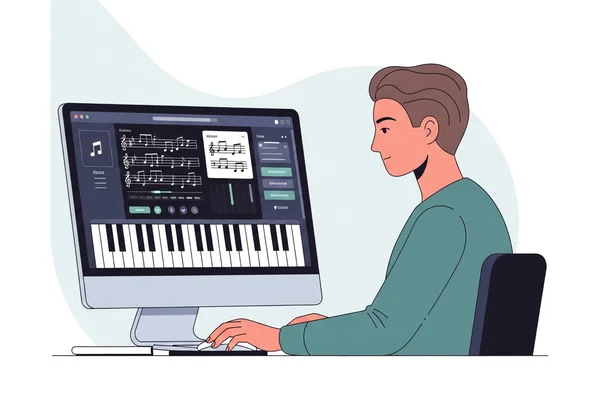
Sight-reading is the skill of playing music you've never seen before. It’s a vital skill that turns a beginner into a musician. However, without proper finger placement, even the simplest melody can feel impossible. That’s where using an online piano keyboard becomes a game-changer. By combining visual sheet music with interactive finger guides, you can bridge the gap between seeing a note and playing it perfectly.
In this guide, we’ll explore the world of piano fingerings and sight-reading. You’ll learn why finger numbers are the "secret code" to fluid playing and how to use modern tools to master them. Whether you’re a curious beginner or a hobbyist looking to sharpen your skills, understanding these foundations will transform your practice sessions.
Understanding Finger Numbers: The Foundation of Piano Technique
Before you can play complex songs, you must understand the basic language of the piano. In piano music, composers often place small numbers above or below the notes. These are not just random suggestions. They are a roadmap for your hands. Mastering these numbers is the first step toward professional technique.
Why Finger Numbers Matter in Piano Playing
Finger numbers exist to make playing easier, faster, and more comfortable. Imagine trying to play a long scale using only your index finger. You would have to jump your hand across the keys, which sounds choppy and slow. By following a specific fingering pattern, you keep your hand in a stable, ergonomic position. This allows you to play multiple notes without unnecessary movement or physical tension.
Proper fingering builds muscle memory. When your finger consistently strikes the same note in a passage, your brain memorizes the movement. Soon, your hands glide automatically—no overthinking needed. This is essential for sight-reading. It allows your eyes to stay focused on the sheet music while your fingers do the work. If you practice piano online, you can see these patterns highlighted in real-time to reinforce the habit.
Repeating the same finger for a note trains your muscles. Your brain links the sensation to the sound—soon, it’s second nature. This consistency is what separates a hesitant beginner from a confident performer.
Standard Finger Numbering for Both Hands
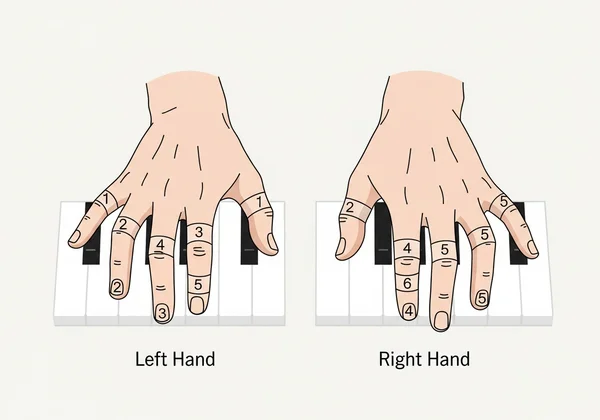
The numbering system for piano is universal. Both the left and right hands follow the same logic, starting from the thumb and moving toward the pinky. Here is the standard breakdown:
- Number 1: The Thumb.
- Number 2: The Index Finger.
- Number 3: The Middle Finger.
- Number 4: The Ring Finger.
- Number 5: The Pinky (Little Finger).
It’s important to remember that these numbers are symmetrical. Your thumbs are always "1," even though they sit on opposite sides of your hands. Beginners often get confused when the music asks for finger "1" on the left hand and finger "1" on the right hand at the same time.
To overcome this, start by practicing simple five-finger patterns. Focus on the physical feel of each finger as you call out its number. Once you internalize these numbers, you’ll easily follow the instructions on any sheet music. This symmetry actually helps with coordination, as it allows your brain to categorize fingers by their strength and role.
Adding Fingerings to Sheet Music on OnlinePiano.io
Learning to read sheet music is much easier when you have a digital assistant. Traditional paper books are great, but they don't give you instant feedback. OnlinePiano.io provides a unique "Score" feature that integrates sheet music directly with the virtual keyboard. This allows you to see the notation and the keys on one screen, making it the perfect environment to learn piano online effectively.
Step-by-Step Guide to Displaying Finger Numbers
To get started with fingerings on the platform, follow these simple steps:
- Access the Score: Visit the homepage and click the "Score" button. This will open the sheet music interface alongside the virtual piano.
- Choose a Song: Select a piece from the built-in library. Start with something simple, like a nursery rhyme or a basic C-major scale.
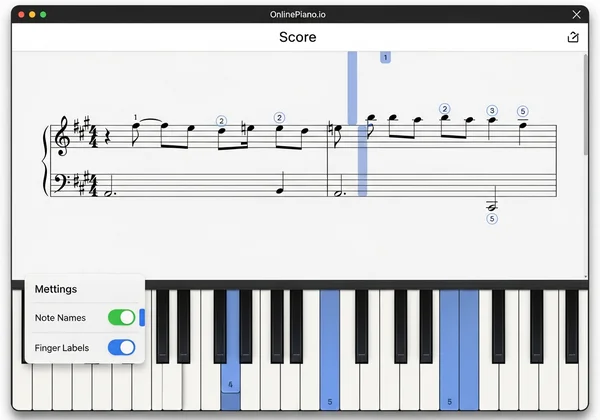
- Enable Labels: Look for the settings menu to toggle note names and finger labels. This will show you exactly which finger (1 through 5) is recommended for each note.
- Sync with the Keyboard: As the music plays or as you click the notes, the corresponding keys on the virtual piano will highlight. You can use your computer keyboard or mouse to follow along.
As the finger number appears on the sheet music and the virtual key lights up, your brain connects three dots: the note on the page, the finger in motion, and the sound you create. This multi-sensory approach accelerates the learning process and builds a deeper understanding of musical structure.
Customizing Finger Markings for Different Skill Levels
One of the best things about using a digital tool is flexibility. As you grow more confident, you might not want all the "training wheels" on at once. Beginners might start with full labels—showing the note names (C, D, E) and the finger numbers (1, 2, 3). This helps reduce the frustration of not knowing where to put your hands in the early days.
As you reach an intermediate level, you can customize the interface to challenge yourself. You might turn off the note names but keep the finger numbers. This forces you to recognize the position of the note on the staff while still receiving guidance on hand movement. Eventually, you can hide all labels and rely entirely on your sight-reading skills. This gradual progression ensures that you’re always learning at a pace that feels comfortable but challenging.
Sight-Reading Exercises That Actually Improve Coordination
Coordination is often the "final boss" for new piano players. Your right hand wants to do one thing, and your left hand wants to follow it like a shadow. To break this habit, you need specific exercises that target independent finger movement. Using strategic fingerings is the most effective way to build this independence.
5 Beginner-Friendly Exercises Using Finger Numbers
If you want to improve quickly, try these five exercises using the virtual piano tool:
- The Five-Finger Walk: Place fingers 1 through 5 on five consecutive white keys (like C to G). Play them slowly up and down. Focus on keeping your hand relaxed and your wrist supple.
- Finger Skipping: Play finger 1, then 3, then 5. This teaches your hand to "skip" a key without losing its fundamental position. It’s the basis for playing chords later on.
- Opposite Motion: With both hands, start on the same note with your thumbs (Finger 1). Move both hands outward toward the pinkies (Finger 5). This is a fantastic way to develop hand independence.
- The "Twinkle" Challenge: Use the Lesson Mode on the site to play "Twinkle Twinkle Little Star." Pay close attention to when the music suggests a finger change to reach those higher notes in the melody.
- Staccato vs. Legato: Practice playing a sequence with finger numbers 1-2-3-4-5 very smoothly (legato), then try it with short, bouncy touches (staccato). This builds control over your finger pressure.
These exercises are designed to be short and repeatable. Even 10 minutes of focused practice each day will yield better results than a two-hour session once a week.
Progressing to Complex Pieces with Strategic Fingerings
As you move beyond basic melodies, you’ll encounter "hand shifts." This is where you have to move your whole hand to a new part of the keyboard. Strategic fingering makes these shifts invisible to the listener. For example, a common technique is the "thumb tuck," where you tuck finger 1 under finger 3 to reach a new set of keys without breaking the sound.
In more complex pieces, fingerings are used to emphasize certain notes or to handle fast passages. When you use the "Audio Recorder" on OnlinePiano.io, you can listen back to your performance. If a section sounds clunky or uneven, it’s usually a sign that your fingering is inefficient. By reviewing the score and adjusting which fingers you use, you can smooth out those difficult transitions and play with a professional flair.
Sight-reading mastery isn’t about relentless drills—it’s about unlocking the joy of playing music freely. Imagine gliding through a new piece, fingers intuitively finding their place while your mind savors the melody. With the right approach, this becomes your reality.
The goal of finger numbers is to give you freedom. When your fingers know where to go automatically, your mind is free to focus on the emotion and beauty of the music. Embrace the learning curve! Don't be afraid to use digital aids to help you through the early stages of your journey.
Ready to put these tips into practice? Head over to the homepage and try the tool today. Open the sheet music, toggle the finger guides, and start playing your favorite songs with newfound confidence!
FAQ Section
Why is proper fingering important when learning to read sheet music?
Proper fingering is essential because it ensures efficiency and prevents physical strain. When you use the correct fingers, you minimize the distance your hand has to travel. This allows for smoother transitions between notes and helps you play faster passages without "tripping" over your own hands. It also helps build the muscle memory required for advanced sight-reading, letting you play by feel rather than by sight.
How quickly can I expect to improve my sight-reading with finger numbers?
Many players feel more confident after just a few weeks of daily mini-sessions. Think of finger numbers like training wheels—they’ll feel essential at first, but soon you’ll be riding smoothly without them. By focusing on finger numbers for just 15 minutes a day, you will find that you stop looking at your hands as much. Consistency is the secret ingredient; using an online tool regularly makes it easier to stick to a daily routine.
Can OnlinePiano.io help me learn to add fingerings to my own sheet music?
Yes! While the platform provides a built-in library of scores with suggested fingerings, you can use the interactive keyboard to test different fingering strategies for any piece you’re studying. By playing a melody on the virtual piano, you can experiment with different hand positions. This helps you see which finger combinations feel the most natural before you mark them down on your physical sheet music.